





Own Your Update
Policy Without Disruptions
Block unwanted Windows updates, avoid surprise restarts, and keep bandwidth under control. A portable utility built for stability, predictability, and peace of mind.

What does Windows Update Blocker do?
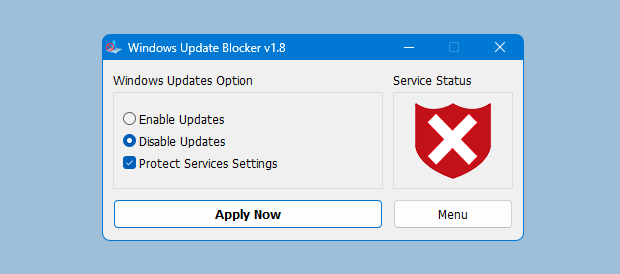
Windows Update Blocker is a portable control utility that gives you direct authority over Windows Update services. Instead of digging through scattered system settings, you can switch updates off or on instantly with a clear status indicator.
Built for stability and performance, it helps you avoid surprise reboots, reduce background downloads, and keep your preferred configuration intact.
Core Capabilities
Explore the tools that make Windows Update Blocker a dependable choice for stable Windows environments. It delivers precise control over update services, reducing surprise restarts and protecting your preferred setup.
Single-Action Control
Enable or disable update services immediately without registry edits or wandering through layered system menus.
See detailsProtection Watch
Stops Windows from silently reactivating update services by monitoring and preserving your chosen state.
See detailsPortable & Lightweight
No installation required. Run it from a folder or USB drive and automate tasks with built-in CLI flags.
See detailsControl Updates in Three Steps
No install required. Download, run, and set your policy.
Download and Launch
Extract the files to any folder. Run the executable directly—no installer and no system changes.
Choose Update Mode
Select "Disable Updates" to pause changes, or switch back to "Enable Updates" when you are ready to patch.
Apply and Confirm
Press the action button to enforce your policy. The status indicator changes to confirm protection.
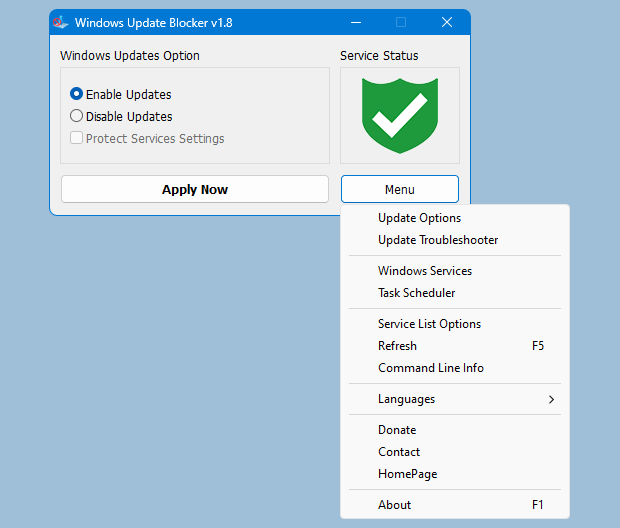
Protect Any Windows Service
Windows Update Blocker can extend protection to additional Windows services.
Update the Wub.ini file to include your custom entries.
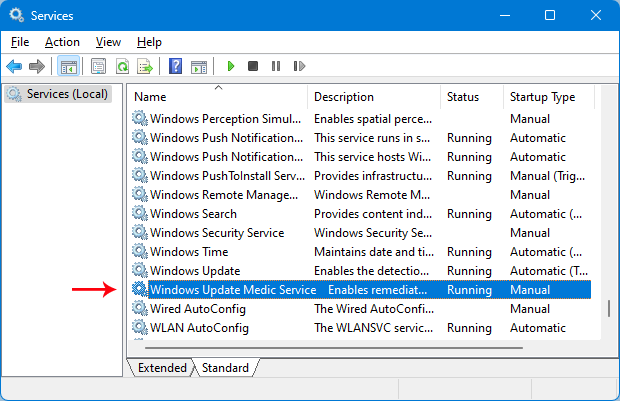
1. Locate the Service
Open Services and locate the service you want to control.
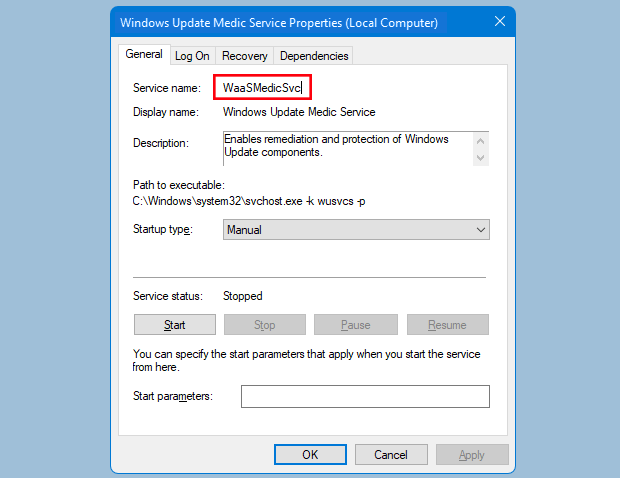
2. Copy the Service ID
Open Properties and copy the exact Service Name value (not the display name).
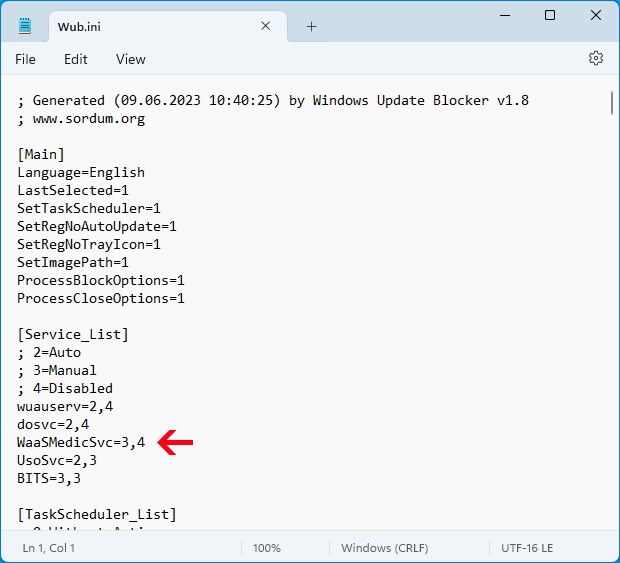
3. Update Wub.ini
Paste the name under the dosvc=2,4 line in the config file.
Sample Entry
Add your service name below the default list. Example for 'MapsBroker':
dosvc=2,4
MapsBroker=2,4 <-- Your New Service
WaaSMedicSvc=3,4
Advanced Admin Toolkit
Built for administrators and power users who require precision controls and automation-friendly workflows.
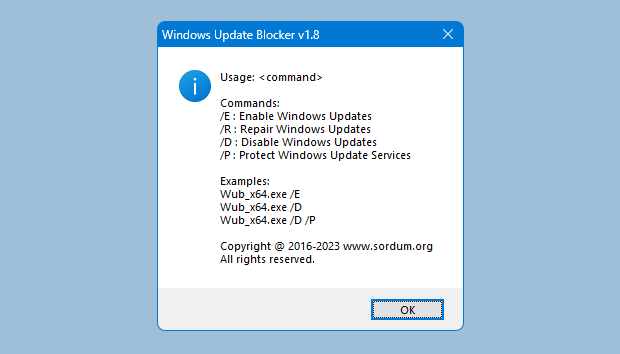
Fine-Grained Service Control
Manage up to 25 custom services with confidence. The Service List Editor lets you set protection and startup behavior without manual file editing.
- Handle up to 25 services
- Toggle "Protect Settings" per service
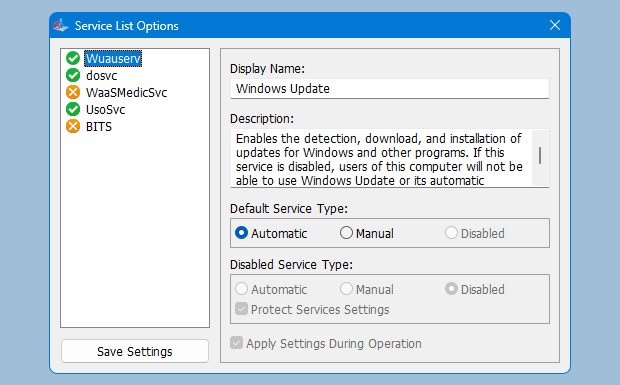
CLI Automation
Ideal for IT teams. Automate tasks with simple flags like "/E" (Enable), "/D" (Disable), or "/P" (Protect) in scripts and deployment tooling.
Why Teams Choose Windows Update Blocker
More Reliable Than Built-In Settings
Windows "pause" controls are limited and can revert without warning. Windows Update Blocker enforces your chosen state until you change it, handling the service dependencies that manual tweaks often miss.
Stability for Critical Work
Unexpected reboots can derail renders, streams, and presentations. This tool acts as a safety lock so your PC behaves predictably when uptime matters most.
Bandwidth & Update Oversight
Background update downloads can consume gigabytes and slow your connection. With direct service control, you decide when bandwidth is used and when updates happen.
Admin-Ready Workflow
For teams managing fleets, Windows Update Blocker includes CLI automation and a portable footprint. Use Wub.ini to replicate configurations across devices without installers.
Who Relies on Windows Update Blocker?
Everyday Users & Gamers
Avoid forced restarts during work, gaming, or streaming. Keep your PC steady and predictable when timing matters.
- Prevent mid-session restarts
- Avoid unstable update rollouts
- Save data on metered connections
IT Administrators
Admins need consistent environments. Windows Update Blocker helps prevent unauthorized OS changes and keep configurations standardized across devices.
- Maintain environment stability
- Deploy with command-line scripts
- Prevent unauthorized changes
Power Users & Enthusiasts
Keep full control over OS behavior. Ideal for benchmarking, legacy apps, or protecting performance-sensitive workflows.
- Control background services
- Run legacy software reliably
- Maximize benchmark performance
Why This Utility Outperforms Manual Methods
Compare Windows Update Blocker with common manual approaches.
Windows Update Blocker
- Persistent Disable (stays off until you change it)
- Protects service settings
- Single-action toggle
- Portable and CLI-ready
Windows Settings / Services.msc
- Temporary pause only (limited days)
- Can revert after reboot
- Buried in system menus
- Manual registry edits required
The Complete Solution for Update Management
WUB represents the evolution of system control tools. While Windows settings offer temporary pauses, WUB provides the depth and permanence required by power users, developers, and system administrators.
Trusted by Teams Worldwide
Real feedback from people who rely on Windows Update Blocker daily.
"No more mid-match restarts. The toggle is fast and reliable, and it keeps my tournament setup stable without surprises."
Alex R.
Esports Player"Rolling this out by CLI across our office was straightforward. It keeps our update configuration intact and avoids unexpected reversions."
Sarah Chen
IT Administrator"Overnight renders used to end with reboots. This tool fixed that quickly and stays out of the way. Lightweight and exactly as described."
Mark D.
Workflow EngineerTrust, Transparency, and Responsible Use
System utilities should be clear and respectful. Windows Update Blocker is a portable utility with no installer, no ads, and no hidden background processes. What you see is exactly what runs.
No subscriptions, no trials, and no surprise charges.
Clean code with a strong reputation for safe use.
Runs directly from the EXE and leaves minimal footprint.
Quick Highlights
A short preview of why Windows Update Blocker is a safe, controlled way to manage updates.
Single-Action Enable/Disable
Toggle Windows Update services without digging through complex system settings.
Protect Service Settings
Preserve your chosen state by preventing automatic reactivation of update services.
Command Line Control
Automate update control with straightforward flags in scripts and deployment tools.
Why Rely on Manual Edits?
See how Windows Update Blocker compares with manual options.
Registry Editing
High RiskWindows Update Blocker
Services.msc
TediousUpdate Control Guides
Explore step-by-step guides for Windows 11 and Windows 10 update control workflows.
Built for Trust & Transparency
Windows Update Blocker is built for legitimate system control. It is a portable utility with a small, auditable footprint and no bundled advertising.
Clear status indicators and straightforward controls keep you fully informed and in charge of update behavior.
Read the trust policySecurity-First Approach
- Free for personal and commercial use
- Runs offline and does not phone home
- Admin rights only when changing services
- Clear ethical usage guidance
Ready to Set Your Update Policy?
Get Windows Update Blocker and stop unwanted system changes in seconds. Join thousands of users who rely on a stable, interruption-free PC.
Get Windows Update Blockerv1.8 • Portable • Free to Use • Verified Clean